Are you willing to start photoshop editing? Are you not understanding how much you should charge for your editing?
Actually, that’s understandable! You know setting up your photo editing price can feel confusing at first. It can be hard to decide whether you should charge per image or per project.
Don’t stress out. Most beginner and even experienced editors struggle with pricing. That’s mainly because there is no standard rate for everyone.
How much you should charge that totally depends on your skills, your time you spent on the image using Photoshop.
So, how much to charge for photoshop editing? Here is what you can expect.
| Experience Level | Per Image | Hourly Rate | Typical Clients |
|---|---|---|---|
| Experience Level | Per Image | Hourly Rate | Typical Clients |
| Beginner | $10 to $25 | $25 to $40 | Small businesses and photographers |
| Intermediate | $25 to $60 | $40 to $75 | Brands, small agencies and professional photographers |
| Advanced | $60 to $150+ | $75 to $150+ | Magazines, eCommerce brands and agencies |
| Commercial / Advertising Expert | $150 to $500+ | $100 to $200+ | Ad campaigns, editorial projects and large-scale commercial work |
Of course, that is not enough to cover all your queries, right? In this article, let’s have a comprehensive discussion in this regard.
How Much To Charge For Photoshop Editing?
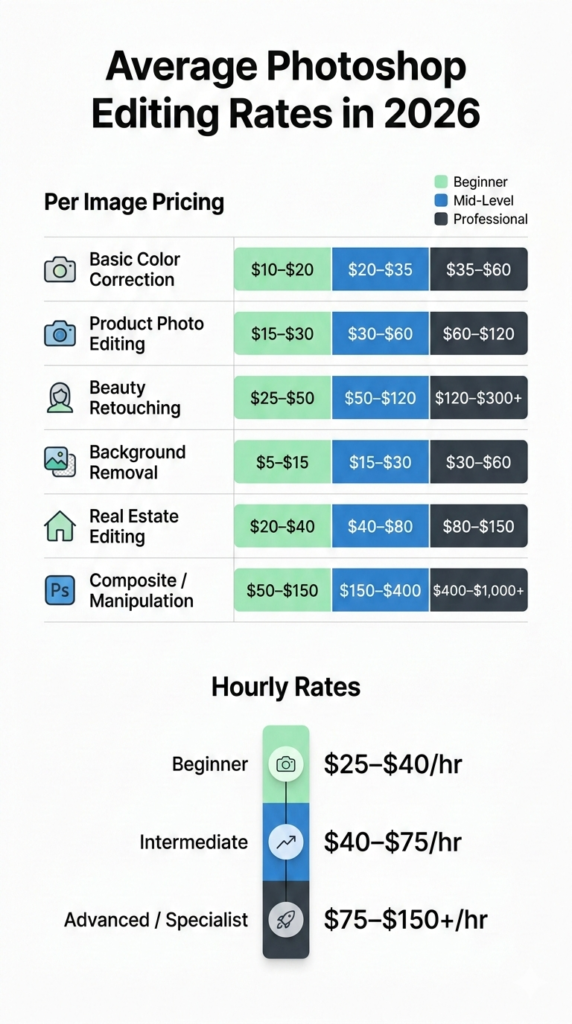
The average rate of Photoshop editing services ranges from $5 to $50 per image. Moreover, the median hourly rate for Adobe Photoshop Experts is $20.
However, that depends on complexity, retouching level, and freelancer or agency rates. Here’s an overview of the average rate of photoshop editing for different types of Photoshop editing.
| Photoshop editing | Beginner Rate | Mid-Level Rate | Professional Rate |
|---|---|---|---|
| Basic color correction | $10 to $20 per image | $20 to $35 | $35 to $60 |
| Product photo editing | $15 to $30 | $30 to $60 | $60 to $120 |
| Beauty retouching | $25 to $50 | $50 to $120 | $120 to $300+ |
| Background removal | $5 to $15 | $15 to $30 | $30 to $60 |
| Real estate editing | $20 to $40 | $40 to $80 | $80 to $150 |
| Composite / manipulation | $50 to $150 | $150 to $400 | $400 to $1,000+ |
Some editors also charge on hourly basis for editing. They charge based on their skill level. For instance, get an idea from below.
| Experience Level | Hourly Rate |
|---|---|
| Beginner | $25 to $40 per hour |
| Intermediate | $40 to $75 per hour |
| Advanced / Specialist | $75 to $150+ per hour |
Moreover, high-end commercial retouchers in cities like New York or Los Angeles even charge more than $150 per hour for advanced editing work. So, you can expect $12 to be an average margin.
Read more: How Much to Charge for Photo Editing in 2026
Photoshop Pricing By Service Type
The prices for photoshop editing varies greatly depending on the service you need for your image. That’s why here we have broken down photoshop rates that the editors generally charge based on different types of services.
Check it out to have an idea of US market rates.
Basic color crrection & adjustments
In Photoshop, even if your image needs simple editing, it can take time. You may need to adjust exposure, contrast, color balance, or cropping that may sound small.
However, you need to do it professionally in Photoshop to ensure high-quality results.
The following is the estimated charge for basic editing in Photoshop.
| Service | Beginner Rate | Mid-Level Rate | Professional Rate |
|---|---|---|---|
| Color correction | $10 to $20 per image | $20 to $35 | $35 to $60 |
| Cropping / resizing | $5 to $15 per image | $15 to $25 | $25 to $40 |
| Exposure / contrast tweaks | $10 to $20 | $20 to $40 | $40 to $60 |
Background removal or clipping path
Background removal and clipping path is a very common service that you may need to provide especially for ecommerce business.
In this case, you can charge based on the complexity of the image. For instance,
| Service | Beginner Rate | Mid-Level Rate | Professional Rate |
|---|---|---|---|
| Simple background removal | $5 to $10 per image | $10 to $20 | $20 to $35 |
| Complex objects like hair or jewelry | $15 to $25 | $25 to $40 | $40 to $60 |
| Batch or bulk projects | Negotiable | Negotiable | Negotiable |
Product retouching for eCommerce
High-quality product images sell better. That’s why the demand for this photoshop editing service is also very high. Generally, photo retouching service includes shadows, reflections, or removing dust/scratches.
Here is what the editors generally charge for this editing.
| Service | Beginner Rate | Mid-Level Rate | Professional Rate |
|---|---|---|---|
| Basic product cleanup | $15 to $25 | $25 to $50 | $50 to $75 |
| Advanced retouch like dust, scratches or reflections | $25 to $50 | $50 to $100 | $100 to $200 |
Beauty & portrait retouching
This is where Photoshop skills really shine. It includes skin retouching, frequency separation, color grading, and high-end cosmetics edits.
Generally, Photoshop editors charge more for this kind of editing service. Here’s an overview.
| Service | Beginner Rate | Mid-Level Rate | Professional Rate |
|---|---|---|---|
| Basic skin retouch | $25 to $50 | $50 to $100 | $100 to $200 |
| Advanced beauty retouch | $50 to $100 | $100 to $200 | $200 to $400+ |
| Full portrait makeover or magazine level | $100 to $200 | $200 to $400 | $400 to $800+ |
Read more: Step-by-Step Guide for Face Smoothing in Photoshop
Composite & creative manipulation
These are the most advanced Photoshop services. You can think of it like advertising campaigns, creative collages, or concept art.
Here is how much you can charge for composite and creative manipulation editing in Photoshop.
| Service | Beginner Rate | Mid-Level Rate | Professional Rate |
|---|---|---|---|
| Simple composite | $50 to $100 | $100 to $250 | $250 to $500 |
| Advanced commercial composite | $150 to $300 | $300 to $600 | $600 to $1,000+ |
| High-end advertising or billboard | $300 to $500 | $500 to $1,000 | $1,000+ |
How Much You Can Charge For Different Pricing Models?
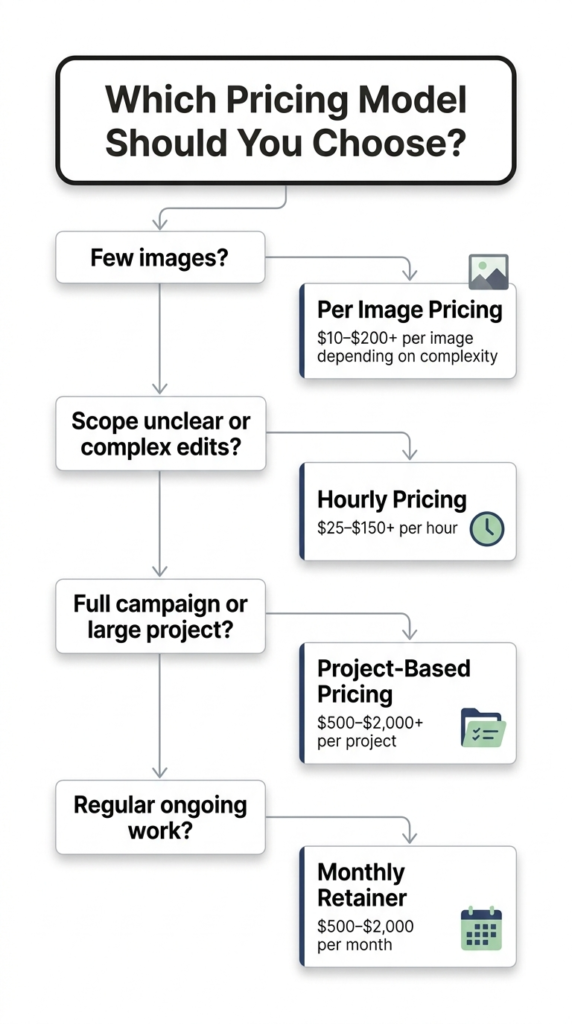
You can also provide different pricing models for your clients to choose from. Photoshop editors usually charge in a few common ways. Let’s break them down so you can pick what works best.
Per image pricing model
This is the most common method for beginners and eCommerce work. You charge a set price for each photo. For example, you can charge $10 to $25 per image for simple edits like cropping or color correction.
On the other hand, product retouching charge falls between $25 to $75 per image and complex edits or beauty retouching more than $50 to $200 per image. You can also offer bulk discounts if your clients have hundreds of images.
But don’t undercut yourself on complex edits.
Hourly pricing model
Hourly rates make sense when the scope is uncertain or edits are complex. Here, you get paid for every minute you work. That’s why this model is perfect for high-end retouching, composites, or when clients don’t know exactly what they need.
Here is what you can charge.
- Beginner: $25 to $40 per hour
- Intermediate: $40 to $75 per hour
- Advanced/Expert: $75 to $150+ per hour
Project-based pricing
Project pricing is ideal for large or custom work. For instance, an entire photoshoot or campaign.
Here, you quote a single price for the whole job.
In this case, rates can range from $500 to $2,000+ depending on complexity and client type. Commercial clients or agencies often prefer this model because it’s predictable for budgeting.
Monthly retainer for ongoing photoshop work
Some clients need regular edits every week or month. For those clients, you can provide this pricing model.
For example, you can charge $500 to $2,000 per month for a set number of images or hours.
Should You Charge Extra For PSD And Source Files?
You may wonder if that’s worth charging extra for PSD or source file. The answer is absolutely yes. You know it;s standard industry practice to charge extra for PSD and source files, typically ranging from 1.5x to 3x the project price.
Clients who want commercial rights or the ability to reuse your work should expect to pay more. Here’s a simple guideline you can follow for extra charges on PSD/source files.
| Service | Suggested Extra Fee (USD) | Notes |
|---|---|---|
| Basic PSD delivery | $10 to $25 per image | Simple edits and small projects |
| Full-layered PSD | $25 to $75 per image | Advanced edits, beauty, product, or eCommerce |
| Commercial usage + PSD | $50 to $150+ per image | High-end clients, advertising and marketing campaigns |
Photoshop Pricing By Experience Level
Starting out as a Photoshop freelancer can feel confusing. But you know, experience makes pricing much easier. The more skilled you are, the higher you can charge. On top of that, clients expect it.
Beginner photoshop editor
If you’re just starting and you can handle basic edits like, simple retouching, background removal, color correction, or clipping path, you can charge $10 to $25 Per image. On hourly basis, the charge can be $25 to $40.
Here, you can expect that your clients will be small businesses or hobby photographers. Don’t worry if you charge on the lower side at first, it’s normal as you’re building trust and experience.
Intermediate retoucher
Once you’ve got some experience and a few projects under your belt, you move to the intermediate level. Now, you can handle more refined edits like better color correction, more advanced retouching or slightly complex edits.
Then you can charge $25 to $60 per image or $40 to $75 per hour. Generally, brands, photographers, and small agencies often hire editors at this level.
Advanced photoshop artist
Advanced editors are pros. They can handle high-end beauty retouching, intricate composites or complex photo manipulations. That’s why they generally charge $60 to $150+ per image or $75 to $150+ per hour.
These freelancers offer professional results consistently. Agencies, eCommerce brands, and premium photographers expect this level of skill and are willing to pay for it.
Photoshop Editing Rates By Region
Where you live and where your clients are affects how much you can charge. Some regions command higher rates because clients there have bigger budgets and expect premium work.
Other regions have lower rates due to local markets or cost‑of‑living differences.
Here’s a global snapshot of typical Photoshop‑related editing rates today.
| Region | Typical Photoshop-Related Rate (per hour) | Notes/ Market Context |
|---|---|---|
| United States & Canada | $40 to $150+ | High demand for premium work |
| UK & Western Europe | $30 to $120 | Strong creative markets |
| Australia & New Zealand | $35 to $100 | Similar to Western Europe |
| Eastern Europe | $15 to $60 | Competitive rates and growing skill base |
| Latin America | $15 to $50 | Rising freelance scene |
| East Asia | $20 to $80 | Wide range depending on country |
| South Asia | $10 to $40 | Lower local costs and global demand growing |
| Southeast Asia | $10 to $35 | Value-focused but improving quality |
| Middle East & North Africa | $20 to $80 | Varies with demand and client budget |
| Sub‑Saharan Africa | $10 to $35 | Emerging freelance market |
Volume Discounts And Bulk Photoshop Pricing
If a client comes to you with a large batch of images, obviously you can’t charge the same way as you would for 1–5 photos. Here you can use volume discounts and bulk pricing.It’s a smart business.
Here, as the clients get better rates, you secure bigger and more predictable projects. Many professional Photoshop services and freelancers follow structured bulk pricing.
Here’s a simple way to see how discounts usually work.
| Number of Images | Bulk Discount | What It Means for You |
|---|---|---|
| 1 to 99 | Standard price | Normal per-image rate applies. |
| 100 to 499 | 10% OFF | Small discounts encourage bigger orders. |
| 500 to 999 | 20% OFF | Good savings for serious eCommerce clients. |
| 1,000+ | 30% OFF | Best rate for large catalogs or campaigns. |
Here is an example to help you out. Let’s say your base price for a simple Photoshop edit like background removal or color correction is $25 per image.
With bulk pricing applied, it could look like this.
| Images Ordered | Your Per-Image Price |
|---|---|
| 10 | $25 |
| 100 | $22.50 (10% off) |
| 500 | $20 (20% off) |
| 1,000 | $17.50 (30% off) |
If you notice, you will see how even with discounts, your work stays profitable while offering value to clients.
Flat-rate bulk pricing example
Some pros prefer flat bulk pricing tiers instead of percent discounts.
Here’s what that can look like
| Bulk Tier | Per-Image Price Example |
|---|---|
| 1 to 49 images | $0.79 to $2.50 |
| 50 to 499 images | $0.59 to $1.99 |
| 500+ images | Custom quote (lowest per-image) |
Flat pricing makes it super easy for clients to understand costs upfront, especially for eCommerce or catalog projects.
Rush Fees, Revisions, And Add-On Pricing
When you work professionally in Photoshop, your base rate doesn’t always cover every client request. Sometimes clients need their images faster, want extra edits, or ask for additional deliverables like layered PSD files.
These situations are common, and charging a little extra is standard practice.
Below, we break down how freelancers usually handle rush fees, revisions, and add‑on services.
| Delivery / Service | Typical Extra Charge / Fee | Notes |
|---|---|---|
| Rush: 48 hours | +25 % | Faster than standard 3 to 5 day delivery |
| Rush: 24 hours | +50 % | High‑priority work, adds real value |
| Rush: Same day | +75 to 100 % | Most urgent, premium pricing |
| Extra revisions | $5 to $25 per image | Charges increase with scope of change |
| Layered PSD files | $15 to $50 per image | Editable source files for client use |
| Advanced retouching | $10 to $50+ per image | High-end detail work or composites |
How To Calculate Your Photoshop Editing Rate
Well, now as you have an idea how much generally the editors charge for Photoshop editing, now let’s see how you can calculate yours. Actually, it’s not a very hard task.
The key is to consider your time, skill, and costs, then add a fair profit. Here’s an easy way to do it.
Step 1: First, you need to set your hourly goal. Decide how much you want to earn per hour. Beginners often aim for $25 to $40 per hour while pros can go $75 to $150 per hour.
Step 2: Then estimate how long each image takes. Here, a basic edit may take 15 minutes, while a complex composite can take several hours.
Step 3: Then add your costs. Here, you should include Photoshop subscription, hardware, or any other tools you need. Divide these by the number of images you plan to edit.
Step 4: At last add a profit or skill premium. If your work is high-quality or specialized, it’s fair to add 10 to 50% extra.
Here’s a simple example for a mid-level edit.
| Item | Value |
|---|---|
| Target hourly rate | $50 |
| Time per image | 30 minutes or 0.5 hour |
| Overhead like software or equipment | $2 per image |
| Skill or Profit | $5 per image |
| Final Price per Image | $32 |
Conclusion
All in all, as you see, setting your photoshop editing rates is about thinking about your value and your skill.
Here, you just need to track your time and choose the right pricing model. Don’t stress out at first. Instead, you should start with confidence and adjust your pricing for your service as your business grows.
Always keep in mind that your rate for your image editing service should show the quality of your work and the effort you are going to put into every image.
That’s today’s cheat sheet!
Need Professional Photoshop Edits?
If you need professional edits to meet your highest standards, trust Clipping Path CA for fast, precise Photoshop and post-production services.