Every great photograph has two lives — the moment the shutter fires, and everything that happens after. Post production photography is that second life. It’s the stage where raw captures are transformed into polished, professional images that tell a story, sell a product, or define a brand’s visual identity.
Whether you’re a product photographer delivering eCommerce catalogs, a fashion shooter working with clothing brands, or a commercial photographer supplying images for advertising campaigns, post production is not an optional finishing step — it’s a fundamental part of the photography process. Professional photo editing can increase social media engagement by up to 650% compared to unedited imagery, and high-quality post production consistently delivers measurable improvements in conversion rates, client satisfaction, and brand credibility.
In this complete guide, we cover everything you need to know about post production photography in 2026 — from understanding the full workflow to mastering the key techniques, choosing the right tools, and knowing when to handle it yourself versus outsourcing to professionals.
| Topic | What You’ll Learn |
|---|---|
| What Is Post Production Photography | Definition, scope, and how it differs from editing |
| Why It Matters | Business impact, conversions, and brand value |
| The Full Workflow | Every stage from import to final delivery |
| Core Techniques | Culling, color, retouching, background, output |
| By Photography Genre | Product, fashion, real estate, portrait |
| Tools and Software | Best software for every stage of post production |
| AI in Post Production | What AI handles and where humans still lead |
| DIY vs. Outsourcing | When to edit yourself vs. hire professionals |
What Is Post Production Photography?
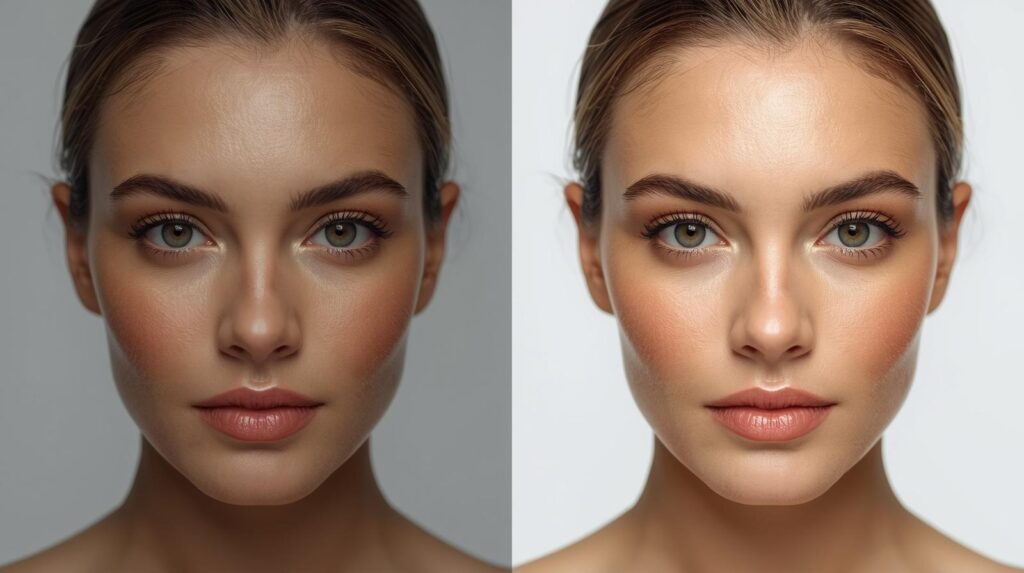
Post production photography refers to all the work carried out on images after the shoot has concluded. It begins the moment the camera card is imported and ends when the final, approved files are delivered to the client or published online.
The term originated in the film and broadcast industries, where “post production” described everything that happened after principal photography was complete — editing, sound mixing, color grading, visual effects, and final output. In still photography, it carries the same meaning: the full chain of work that transforms raw captures into finished images.
It’s important to distinguish post production photography from simple photo editing:
| Photo Editing | Post Production Photography | |
|---|---|---|
| Scope | Adjusting individual images | Full workflow from import to delivery |
| Includes | Exposure, color, crop | Culling, editing, retouching, output, delivery |
| Who does it | Anyone with editing software | Professional photographers and retouchers |
| Output | A better image | A complete, client-ready image package |
Post production photography is the full system, not just one step within it. Understanding it as a system — rather than a single task — is what separates photographers who consistently deliver professional results from those who struggle with inconsistency and slow turnaround.
Why Post Production Photography Matters in 2026
The Camera Doesn’t Finish the Job
Even the most experienced photographers with the most expensive cameras produce raw files that require post production work. RAW files are intentionally unprocessed — they contain maximum image data precisely so that decisions about color, tone, sharpness, and contrast can be made deliberately in post production rather than baked in by the camera’s onboard processor. Shooting RAW without post production is like developing a film negative but never making a print.
Visual Standards Are Higher Than Ever
Buyers, clients, and audiences in 2026 are visually sophisticated. They interact with thousands of professionally produced images every day across social media, advertising, and eCommerce platforms. Their baseline expectation for image quality is high — and images that fall below that standard are simply scrolled past or ignored. Professional post production is what makes images meet that standard consistently.
Direct Business Impact
The business case for professional post production photography is well-established:
- High-quality edited product images drive up to 30% higher eCommerce conversion rates
- Professionally retouched images reduce product return rates by setting accurate buyer expectations
- Consistent post production across a brand’s image library increases brand recognition and trust
- Well-edited images perform significantly better in Google Shopping and paid social ad campaigns
- Photographers with fast, efficient post production workflows can take on 25–35% more shoots annually without additional staff
The Complete Post Production Photography Workflow
A professional post production photography workflow has distinct, sequential stages. Skipping or rushing any stage creates bottlenecks and quality problems downstream. Here’s the full professional workflow from shoot to delivery:
Stage 1 — File Ingest and Backup
The post production workflow begins the moment you return from the shoot. Before any editing begins, files must be safely ingested and backed up. Professional standard is the 3-2-1 backup rule: three copies of every file, on two different storage media, with one copy stored offsite (or in cloud storage).
Import files into your DAM (Digital Asset Management) software — typically Adobe Lightroom, Capture One, or Photo Mechanic. Use consistent folder naming conventions: client name, shoot date, job number. Establish this system from day one and never deviate — it becomes the foundation of a scalable post production operation.
Stage 2 — Culling and Selection
Culling is the process of reviewing all captured images and selecting the best frames for editing. This is the most time-consuming and underappreciated stage of post production photography — but getting it right dramatically reduces wasted editing time.
Professional culling evaluates images on:
- Technical quality — sharpness, exposure, and focus accuracy
- Composition — framing, angle, and subject positioning
- Expression and movement — for lifestyle and on-model shots
- Coverage — ensuring all required angles and shots are represented
- Consistency — selecting frames that work together as a cohesive set
In 2026, AI culling tools like Aftershoot and Lightroom’s AI-powered selection have dramatically accelerated this stage — handling first-pass culling in minutes rather than hours. However, final selection decisions for client deliverables still require human review and judgment.
Stage 3 — Global Corrections
With selects confirmed, global corrections are applied in Lightroom or Capture One to establish the correct baseline for every image in the batch:
- White balance — removing color casts from studio or ambient lighting
- Exposure — setting correct overall brightness level
- Highlights and shadows — recovering detail from overexposed and underexposed areas
- Contrast and clarity — adding appropriate midtone depth and texture
- Lens correction — removing distortion, chromatic aberration, and vignetting
Apply corrections to one hero image, then sync across the full batch using Lightroom’s Sync Settings or Capture One’s Styles system. This creates immediate consistency across hundreds of images in seconds — the backbone of efficient post production at volume.
Stage 4 — Detailed Retouching in Photoshop
After global corrections are set, images requiring detailed work move to Photoshop. This is where the precision work happens — the editing that transforms technically correct images into commercially polished ones.
Detailed retouching in post production photography includes:
- Background removal — using clipping path or image masking to isolate subjects cleanly
- Surface retouching — removing dust, scratches, lint, and surface marks from products
- Wrinkle and fold smoothing — for apparel and soft goods
- Color correction — precise color matching to physical samples or brand references
- Shadow creation — adding natural or drop shadows to ground the subject
- Ghost mannequin editing — for apparel brands using our ghost mannequin service
- Compositing — combining multiple images into a single final frame
Stage 5 — Color Grading and Brand Consistency
Color grading goes beyond technical color correction — it applies a deliberate aesthetic tone to images that defines a brand’s visual identity. Where color correction asks “does this image look accurate?”, color grading asks “does this image look right for this brand?”
Professional color grading in post production photography uses:
- Lightroom Presets or Capture One Styles — for batch-consistent brand grading
- Photoshop Color Lookup (LUT) layers — for precise, brand-specific color treatments
- Selective Color adjustment layers — for fine-tuning specific color ranges
- Curves — for precise tonal and color channel control
Stage 6 — Quality Control
Before any image leaves the studio, it goes through a quality control check. This is a non-negotiable stage in professional post production photography. QC verifies:
- Background purity — pure white (RGB 255,255,255) for marketplace images
- Edge cleanliness — no jagged edges, halos, or missed masking areas
- Color accuracy — matches physical product or client reference
- Consistency — all images in the batch have matching treatment
- File specifications — correct dimensions, resolution, format, and file size
Stage 7 — Export and Delivery
The final stage of post production photography is exporting files in the correct specifications for each intended use and delivering them to the client through the agreed channel — typically Dropbox, Google Drive, WeTransfer, or a client gallery platform.
| Use Case | Format | Resolution | Size |
|---|---|---|---|
| Amazon / eCommerce | JPEG | 72 DPI | 1000×1000px min (1600px+ for zoom) |
| Print / Catalog | TIFF or JPEG | 300 DPI | As required by printer |
| Web / Social Media | JPEG or WebP | 72 DPI | 1080×1080px or platform spec |
| Design Assets | PNG (transparent) | 72–300 DPI | As required |
| Archive / Master | TIFF or RAW | 300 DPI | Full resolution |
Shoot Done? We Handle the Rest.
Clipping Path CA specializes in professional post production for photographers and brands worldwide — background removal, color correction, retouching, and delivery-ready output. From $0.25/image with 24-hour turnaround.
Post Production Photography by Genre
Post production photography looks different across different genres. The core workflow is consistent, but the priorities and techniques vary significantly depending on what was shot:
Product and eCommerce Photography
Product post production is the most technically precise genre. Every image must meet exact marketplace specifications — pure white backgrounds, minimum pixel dimensions, no watermarks, accurate color representation. The post production workflow for product photography prioritizes background removal, color accuracy, surface cleaning, and shadow creation above all else. Volume is also a key consideration — professional eCommerce post production must be efficient enough to handle catalogs of hundreds or thousands of SKUs without compromising quality.
Fashion and Apparel Photography
Fashion post production combines technical precision with creative flair. On top of standard product post production requirements, fashion images need careful fabric color management (textiles shift dramatically under different lights), ghost mannequin editing for studio apparel shots, wrinkle and drape correction, and brand-consistent color grading that reinforces the label’s aesthetic identity. High-end fashion editorial work also requires skin retouching for on-model images using frequency separation techniques.
Real Estate Photography
Real estate post production is transformative — and often dramatic. A well-lit, well-composed interior shot becomes a compelling listing image through careful HDR blending, sky replacement, perspective correction, and color grading that makes spaces feel warm and inviting. Our professional real estate photo editing service handles the full post production workflow for property photographers — turning raw shoots into compelling, sales-ready listing images.
Portrait Photography
Portrait post production focuses on skin retouching, background work, and color grading that flatters the subject while remaining true to their natural appearance. Professional portrait retouching uses frequency separation to clean skin while preserving natural texture — avoiding the plastic, over-smoothed look that characterizes low-quality retouching. Our photo retouching services cover portrait retouching for photographers, studios, and agencies at any volume.
Commercial and Advertising Photography
Commercial post production is the most complex and creatively demanding genre. Images for advertising campaigns, billboards, and editorial placements are viewed at large scale and scrutinized closely — every imperfection is visible. Commercial post production frequently involves complex compositing (combining multiple exposures or separate elements), advanced retouching, and extensive color grading to achieve a specific creative look that aligns with the campaign’s visual concept.
| Genre | Primary Post Production Focus | Key Technique |
|---|---|---|
| Product / eCommerce | Background, color accuracy, surface cleaning | Clipping path, color correction |
| Fashion / Apparel | Ghost mannequin, fabric color, brand grading | Ghost mannequin, frequency separation |
| Real Estate | HDR blend, sky, perspective, warmth | HDR merge, sky replacement |
| Portrait | Skin retouching, background, color | Frequency separation, dodge and burn |
| Commercial / Advertising | Compositing, advanced retouching, creative grade | Layer compositing, LUT grading |
Best Software for Post Production Photography in 2026
Adobe Lightroom Classic — Workflow Foundation
Lightroom Classic remains the essential tool for the global correction and batch processing stages of post production photography. Its non-destructive RAW workflow, powerful preset system, and deep Photoshop integration make it the starting point for virtually every professional post production workflow. The 2026 version adds significantly improved AI masking and subject selection tools that accelerate sky replacements, background selections, and portrait corrections.
Adobe Photoshop — Detail and Precision
Photoshop is the workhorse of detailed post production photography — background removal, retouching, compositing, shadow work, and advanced color grading all happen here. Its 2026 feature set includes significantly enhanced Generative Fill capabilities for background replacement and object removal, though for product and eCommerce images, manual clipping path and retouching remain the professional standard for precision and accuracy.
Capture One Pro — Superior Color
Capture One’s color rendering and advanced color grading tools make it the preferred choice for high-end fashion and commercial photographers who need precise control over color at every stage of post production. Its Styles system, Color Editor, and tethered shooting capabilities are unmatched in the industry.
Photo Mechanic — Speed Culling
Photo Mechanic is the fastest culling tool available — significantly faster than Lightroom for reviewing and rating large batches of images. High-volume commercial and sports photographers use it exclusively for the culling stage before handing selected images off to Lightroom for editing.
Aftershoot — AI-Powered Workflow
Aftershoot uses AI to handle first-pass culling and baseline edits, dramatically reducing the time cost of the early post production stages. Photographers using AI-assisted workflows in 2026 report cutting their post production time by 30–50% on average — allowing them to take on significantly more work without compromising delivery standards.
| Software | Best Stage | Cost |
|---|---|---|
| Adobe Lightroom Classic | Import, culling, global corrections, batch | Included in Adobe CC ($54.99/mo) |
| Adobe Photoshop | Retouching, masking, compositing, output | Included in Adobe CC |
| Capture One Pro | Color grading, tethered shooting | $24/mo or $299 one-off |
| Photo Mechanic | High-speed culling | $199 one-off |
| Aftershoot | AI culling and base edits | From $9/mo |
AI in Post Production Photography — What It Handles and Where Humans Lead
AI has fundamentally changed post production photography in 2026. Tasks that once took hours can now be completed in minutes. But AI’s capabilities have clear limits — and understanding where those limits are is critical for maintaining professional quality standards.
| Task | AI Performance | Human Still Needed? |
|---|---|---|
| Basic culling | Excellent — fast and accurate | For final client selection |
| Simple background removal | Good for simple products | Yes — for complex edges, jewelry, hair |
| Exposure / white balance | Good baseline correction | Yes — for brand-specific requirements |
| Skin retouching | Basic only | Yes — for any professional standard |
| Color matching to physical sample | Cannot do reliably | Yes — always |
| Ghost mannequin editing | Cannot do | Yes — always |
| Complex compositing | Cannot do | Yes — always |
| Creative color grading | Preset-based only | Yes — for brand-specific results |
The 2026 professional standard is AI-assisted human editing — AI handles the repetitive, time-consuming tasks (culling, basic corrections, simple background removal), freeing human retouchers to focus on the precision and creative work that determines final image quality. Fully automated AI output, without human oversight and finishing, consistently falls short of professional standards for commercial and eCommerce use.
Read more: Professional Photo Retouching Services — Expert Manual Editing
How to Build an Efficient Post Production Photography Workflow
Standardize Everything
The fastest post production workflows are built on standardization. Folder naming conventions, import presets, export presets, style guides — every repeatable decision should be made once and systematized. Every time you make the same decision manually, you’re losing time that could be eliminated by a well-designed workflow system.
Build a Library of Presets and Templates
Create Lightroom presets for every client and project type you regularly work with. Build Photoshop actions for your most common retouching sequences. Develop export presets for every platform you regularly output to. A well-stocked preset library can cut post production time by 40–60% on repeat client work.
Use Tethered Shooting to Reduce Post Production Time
Tethered shooting — connecting your camera directly to your editing software so images appear on screen immediately as they’re captured — allows problems to be identified and corrected during the shoot rather than discovered in post production. Color issues, focus problems, and composition errors caught on the shoot day cost nothing to fix. Caught in post production, they cost hours.
Outsource What You Can
The most efficient photographers and studios outsource the post production stages that don’t require their direct creative input — particularly background removal, surface retouching, and batch color correction for product work. Outsourcing these tasks to a professional service like Clipping Path CA frees photographers to focus on shooting, client relationships, and business development — the activities that actually grow a photography business.
DIY vs. Outsourcing Post Production Photography
| DIY Post Production | Outsourced to Professionals | |
|---|---|---|
| Cost | Software only — time cost is high | Per-image fee, no time cost |
| Quality | Skill-dependent, variable | Consistent, professional standard |
| Volume capacity | Limited by editing hours | Unlimited — scales with demand |
| Turnaround | Days to weeks for large batches | 24–48 hours standard |
| Consistency | Hard to maintain across large batches | Guaranteed by style guide application |
| Best for | Under 30 images/month | 30+ images/month, any volume |
For photographers and brands producing more than 30 images per month, outsourcing post production photography to a professional service is almost always more cost-effective than DIY — when the real cost of time is factored in. Explore our full range of professional photo editing services and see our work in our portfolio.
Read more: eCommerce Photo Editing — Complete Guide for Online Sellers
Conclusion
Post production photography is where technical skill meets creative vision — and where great photography is finished. A shoot without a solid post production workflow is like a manuscript without editing: full of potential, but not ready for the world.
In 2026, the photographers and brands winning commercially are those who treat post production as a system — not an afterthought. They shoot in RAW, cull efficiently, apply consistent global corrections, retouch precisely, grade for brand consistency, and deliver on time. They use AI to accelerate the repetitive work and human expertise to handle the precision decisions that AI cannot reliably make. And they outsource the volume work that doesn’t require their direct creative input, freeing themselves to focus on the shoot and the creative direction that defines their work.
Whether you handle post production entirely in-house, outsource it entirely, or use a hybrid approach, the principles remain the same: be systematic, be consistent, be precise, and never compromise on quality at the final delivery stage.
Ready to Streamline Your Post Production?
Clipping Path CA handles the post production work that slows photographers down — background removal, color correction, retouching, shadow effects, ghost mannequin editing. Manual editing by expert Photoshop retouchers. From $0.25/image, 24-hour turnaround, free revisions.