Glamour photography editing is the art of transforming a beautifully shot photograph into a polished, visually compelling image that radiates confidence, elegance, and aspiration. Whether you’re editing fashion campaigns, beauty portraits, or lifestyle imagery for premium brands, the retouching decisions you make in post production directly determine how powerful the final image becomes.
Unlike standard product retouching, glamour photo editing requires a delicate balance — enhancing the subject’s natural beauty while preserving authenticity, refining details while keeping the image feeling real and emotional. Get it wrong in either direction — over-retouch and the subject looks artificial, under-retouch and the image looks unfinished — and the photograph loses its commercial power entirely.
In this complete guide, we cover everything you need to know about glamour photography editing — from essential techniques and professional Photoshop workflows to skin retouching, color grading, and how to develop the eye of an experienced glamour photo editor.
| Topic | What You’ll Learn |
|---|---|
| What Is Glamour Photography Editing | Definition, scope, and how it differs from standard retouching |
| Core Retouching Techniques | Skin, hair, eyes, makeup enhancement in Photoshop |
| Color Grading for Glamour | Tone, mood, and brand-consistent color treatment |
| Lighting Enhancement | Dodging, burning, and sculpting light in post |
| Common Mistakes | Over-retouching, color errors, and how to avoid them |
| Workflow and Tools | Software, presets, and professional process |
| DIY vs. Outsourcing | When to edit yourself vs. hire a glamour photo editor |
What Is Glamour Photography Editing?
Glamour photography editing is the post-production process applied to glamour, beauty, and fashion images — enhancing the subject’s appearance, refining the image’s tonal quality, and creating a final look that communicates luxury, sophistication, and visual impact.
It sits at the intersection of technical precision and creative artistry. A skilled glamour photo editor understands both the technical mechanics of Photoshop retouching and the aesthetic sensibility required to make an image feel aspirational without feeling fake. The best glamour editing is invisible — viewers don’t see the retouching, they just see a stunning photograph.
Glamour photo editing typically covers:
- Skin retouching — smoothing texture, removing blemishes, evening skin tone
- Hair retouching — flyaway removal, volume enhancement, color consistency
- Eye enhancement — brightening whites, sharpening iris detail, removing redness
- Makeup refinement — evening lip color, correcting mascara, enhancing contouring
- Body sculpting — subtle liquify adjustments for posture and proportion
- Color grading — establishing the image’s overall mood and brand tone
- Light sculpting — using dodge and burn to enhance the three-dimensional quality of the original lighting
- Background work — cleaning, extending, or replacing backgrounds
Unlike standard product photo retouching, glamour editing is deeply personal — the subject is a human being, and every retouching decision has aesthetic, ethical, and commercial implications. Understanding where to draw the line between enhancement and distortion is the defining skill of a professional glamour photo editor.
Why Glamour Photography Editing Matters for Brands
First Impressions Are Formed in Milliseconds
Research shows that viewers form an opinion of an image in as little as 50 milliseconds. In fashion and beauty advertising, that first impression is the only one that matters — there is no second chance to engage a buyer who has already scrolled past your campaign image. Professional glamour photo editing ensures that every image makes the strongest possible first impression, every time.
Communicates Brand Positioning
The quality of a brand’s glamour photography editing is a direct signal of its market positioning. Luxury brands like UGG, Chanel, and Burberry invest heavily in retouching precisely because their buyers associate image quality with product quality. A poorly edited campaign image suggests a brand that doesn’t care about details — and if they don’t care about their images, why would buyers trust their products?
Drives Engagement and Conversion
Professionally edited glamour images consistently outperform unretouched or poorly edited alternatives in engagement metrics across Instagram, Pinterest, and paid advertising platforms. Higher engagement means lower cost-per-click in paid campaigns, more organic reach through platform algorithms, and ultimately higher conversion rates on the product or campaign being promoted.
Enables Consistent Visual Identity
A brand’s visual identity is built on consistency — a recognizable look, feel, and color palette that appears across every campaign, season after season. Professional glamour photo editing with a defined style guide ensures that every image in a brand’s library feels like it belongs to the same visual family, regardless of which photographer shot it or which model was featured.
Core Glamour Photo Editing Techniques
Skin Retouching — The Foundation of Glamour Editing

Skin retouching is the most visible and most important element of glamour photo editing. The goal is not perfection — it’s idealization. The subject should look like the best, most polished version of themselves, not like a digitally painted mannequin.
Professional glamour photo editors use frequency separation as the primary skin retouching technique. This Photoshop method separates the image into two layers — one containing the skin’s color and tone (low frequency), and one containing its texture and detail (high frequency). Corrections can then be applied to color and texture independently, allowing even skin tone without losing the natural texture that makes skin look real.
The frequency separation workflow for glamour editing:
- Duplicate the background layer twice
- Apply Gaussian Blur to the bottom copy (typically 4–8px depending on image resolution)
- On the top layer, apply Image → Apply Image using the blurred layer to extract texture
- Set the texture layer to Linear Light blend mode
- Paint on the color/tone layer with a soft brush to even skin tone without touching texture
- Use the Clone Stamp on the texture layer to remove blemishes while preserving surrounding skin texture
Dodge and Burn — Sculpting Light in Post
Dodge and burn is the technique that separates good glamour retouching from great glamour retouching. By selectively lightening (dodging) and darkening (burning) specific areas of the image, retouchers sculpt three-dimensional depth and structure into the subject’s face and form — enhancing the existing lighting to make cheekbones more defined, eyes more dramatic, and the overall image more visually compelling.
Professional dodge and burn technique for glamour editing:
- Create a new layer filled with 50% grey, set to Overlay or Soft Light blend mode
- Paint white (soft brush, 5–10% opacity) to dodge — lighten highlight areas, brighten eyes, lift cheekbone highlights
- Paint black to burn — deepen shadows under the jaw, around the nose, and in hair to add depth
- Work in multiple light passes rather than one heavy application — build up gradually
- Zoom out regularly to evaluate the three-dimensional effect at full image view
Eye Enhancement
Eyes are the most emotionally powerful element of any portrait or glamour photograph. Professional eye enhancement in glamour photo editing includes:
- Brightening the whites — using a Hue/Saturation layer (desaturate red and yellow channels) to remove redness, combined with a Curves layer to lift brightness. Apply only to the white areas using a precise layer mask
- Sharpening the iris — apply High Pass sharpening specifically to the iris detail using a precise mask. This makes eyes appear sharper and more vivid without affecting surrounding skin
- Enhancing iris color — use a Hue/Saturation adjustment layer clipped to the iris area to deepen or shift eye color. Keep adjustments subtle — dramatic color changes look unnatural
- Catchlight enhancement — the small specular highlight in the eye that gives it life and depth. If the catchlight is small or multiple, use the Dodge tool to brighten and unify it
Hair Retouching
Hair retouching in glamour photography editing focuses on three primary tasks: flyaway removal, color consistency, and volume enhancement.
Flyaway removal uses the Healing Brush and Clone Stamp to eliminate stray hairs against the background. Work in the direction of hair flow, not against it. For complex backgrounds, the Patch Tool or Content-Aware Fill can handle larger flyaway areas efficiently.
Color consistency corrects areas where the hair’s color has shifted due to inconsistent lighting across the head — particularly common with very dark or very light hair under directional studio lights. Use a Hue/Saturation layer masked to the affected area to bring the color back into balance.
Volume enhancement uses the Liquify tool’s Bloat and Push brushes to subtly increase the visual volume of hair where it has compressed or fallen flat. Use at very low pressure (5–10%) and work in gentle, cumulative adjustments.
Makeup and Lip Enhancement
Even the most carefully applied makeup picks up imperfections under studio lights — uneven lip color edges, eyeshadow that has shifted slightly, or foundation that appears patchy at full resolution. Glamour photo editing refines these details:
- Lip color evening — use a Hue/Saturation layer masked to the lip area to unify color across both lips. Use the Healing Brush to clean any color that has bled outside the lip line
- Lipstick shine enhancement — for glossy lips, use the Dodge tool at low opacity to enhance the natural specular highlights that give lips their wet, dimensional look
- Eye makeup cleanup — remove smudges and sharpen liner edges using the Healing Brush. For mascara clumping on lashes, carefully Clone Stamp in clean lash texture from a nearby area
Need Professional Glamour Photo Editing?
Clipping Path CA delivers expert glamour photography editing for fashion brands, photographers, and creative agencies worldwide. Skin retouching, color grading, hair work — professional results from $5/image with 24-hour turnaround.
Color Grading for Glamour Photography
Color grading is where glamour photo editing becomes truly creative. Beyond technical color correction — which ensures colors are accurate — color grading applies a deliberate aesthetic tone that defines the image’s mood, emotion, and brand identity.
Understanding Glamour Color Palettes
Different glamour aesthetics call for different color grading approaches:
| Glamour Style | Color Palette | Photoshop Approach |
|---|---|---|
| Classic / Timeless | Neutral tones, clean whites, rich blacks | Subtle S-curve, lifted shadows, no color cast |
| Warm / Luxe | Golden highlights, warm midtones, creamy skin | Warm shadows, orange/gold highlights in Curves |
| Cool / Editorial | Cool highlights, desaturated skin, deep blues | Cool shadows, slight cyan shift in highlights |
| High Fashion | High contrast, graphic black and white or bold color | Strong curves, selective color, dramatic shadows |
| Natural / Fresh | Clean, slightly matte, soft contrast | Lifted blacks, reduced saturation, airy feel |
Color Grading Workflow for Glamour Images
A professional glamour photo editing color grading workflow in Photoshop:
- Step 1 — Color correction first: Use Curves to neutralize any color cast from studio lighting. Set a true neutral grey point before any creative grading begins
- Step 2 — Skin tone check: Use the Info panel to verify skin tone values sit within acceptable RGB ranges for the subject’s skin tone. Glamour retouching should enhance skin, never distort it
- Step 3 — Apply shadow and highlight color: Use a Color Balance or Curves adjustment to add warmth to highlights and a complementary cool tone to shadows — this split toning creates depth and cinematic quality
- Step 4 — Selective color adjustments: Use Selective Color to fine-tune specific color ranges — particularly reds (skin), yellows (warm tones), and cyans/blues (background and shadows)
- Step 5 — Overall saturation and vibrance: Apply a subtle Vibrance adjustment to lift the image’s color richness without oversaturating skin tones. Vibrance is always preferable to Saturation for glamour work — it protects already-saturated skin from going orange
Read more: Professional Color Correction Services — Accurate Color for Every Image
Background Work in Glamour Photo Editing
The background of a glamour image is not a passive element — it’s an active part of the composition that affects the perceived quality of the entire image. Professional glamour photo editing pays careful attention to background work:
Background Cleaning
Even the most carefully prepared studio backdrop picks up marks, scuffs, shadows, and tonal inconsistencies under studio lights. Background cleaning in glamour editing uses the Healing Brush, Clone Stamp, and Content-Aware Fill to create a perfectly even, distraction-free background — whether that’s a clean gradient, a flat white, or a textured surface. Our professional background removal service handles this efficiently for high-volume glamour shoots.
Background Replacement
For campaign images where the background needs to be completely replaced — whether changing a studio background to a lifestyle scene or creating a branded composite — glamour editing requires precise image masking around the subject, particularly for complex hair and fine clothing details. This is one of the most technically demanding aspects of glamour photo editing, requiring manual masking skill that AI tools consistently fail to deliver at a professional standard.
Vignetting
A subtle vignette — darkening the corners and edges of the frame — is a classic glamour editing technique that directs the viewer’s eye toward the subject and adds a sense of depth and cinematic quality to the image. Applied with restraint (opacity 20–40%, soft feather), it enhances without being obvious. Applied too heavily, it becomes a distracting 1990s studio photography cliché.
Glamour Photo Editing for Different Applications
Fashion Brand Campaigns
Fashion campaign glamour editing is driven by the brand’s visual identity guidelines — a defined color palette, retouching standard, and aesthetic look that must be applied consistently across every image in the campaign. Fashion glamour photo editing often involves multiple retouchers working to a detailed style guide, with a lead retoucher responsible for setting and maintaining the look across the full image set.
eCommerce Fashion and Apparel
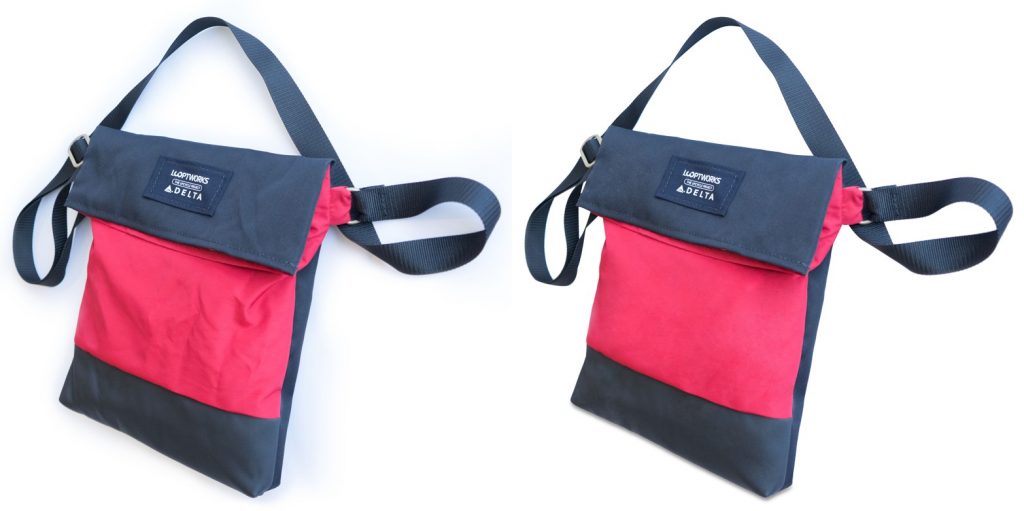
eCommerce glamour editing balances aspirational visual quality with the practical need for color accuracy — the buyer must be able to trust that the color they see in the campaign image matches the product they receive. Our eCommerce photo editing service handles on-model glamour images at volume, delivering consistent retouching that enhances the model and product while keeping colors marketplace-accurate.
Beauty and Cosmetics
Beauty glamour photography editing is the most demanding category for skin and makeup retouching. Close-up beauty shots reveal every detail of the skin, the product application, and the lighting — and every imperfection is clearly visible at the large display sizes used in beauty advertising. Beauty retouching requires the highest level of frequency separation precision and makeup enhancement skill.
Portrait and Headshot Photography
Professional portrait and headshot glamour editing applies a lighter touch than fashion or beauty work — the goal is a polished, confident subject rather than a fashion-forward editorial look. Skin retouching is more conservative, color grading is typically neutral or subtly warm, and the emphasis is on clarity, detail, and a natural-looking finish. Our professional retouching service delivers consistent portrait glamour editing for photographers and studios at any volume.
| Application | Retouching Level | Color Grade | Key Priority |
|---|---|---|---|
| Fashion Campaign | High — full glamour | Brand-specific, creative | Brand identity consistency |
| eCommerce Fashion | Medium — natural but polished | Accurate, clean | Color accuracy + appeal |
| Beauty / Cosmetics | Very high — precision | Warm, luminous | Skin and makeup perfection |
| Portrait / Headshot | Light — natural | Neutral to warm | Confidence, clarity |
| Social Media Content | Medium — quick turnaround | On-brand, vibrant | Engagement, visual impact |
Best Software for Glamour Photography Editing
Adobe Photoshop — The Industry Standard
Photoshop is the non-negotiable tool for professional glamour photo editing. Its frequency separation capability, dodge and burn precision, masking tools, and unlimited adjustment layer system make it the only software capable of delivering professional-standard glamour retouching. The 2026 version’s AI-powered skin smoothing tools can accelerate basic skin work, but professional glamour editing still requires the manual precision that only experienced human retouchers working in Photoshop can deliver.
Adobe Lightroom — Global Corrections and Batch
Lightroom handles the global correction stage of glamour photo editing — white balance, exposure, basic color, and lens correction — efficiently across large batches. Its Masking tools allow AI-powered subject selection for quick global skin adjustments before images move to Photoshop for detailed work. For high-volume glamour editing workflows, Lightroom’s batch capability is essential.
Capture One — Superior Skin Rendering
Capture One’s color rendering is particularly valued by fashion and glamour photographers for its ability to render skin tones more accurately and cleanly than Lightroom — particularly for darker skin tones that other RAW processors handle less well. Its advanced color grading tools and skin tone selection make it increasingly popular for high-end glamour and beauty work.
Luminar Neo — AI-Assisted Glamour Editing
Luminar Neo’s AI Skin Enhancer and Portrait Bokeh tools offer a faster path to basic glamour editing results for photographers who don’t have advanced Photoshop skills. The results are competent for social media content but rarely meet the standard required for commercial fashion and beauty work without additional manual finishing.
| Software | Best For | Glamour Editing Strength |
|---|---|---|
| Adobe Photoshop | All detailed glamour retouching | Industry standard — unmatched precision |
| Adobe Lightroom | Global corrections, batch processing | Speed and consistency across large sets |
| Capture One | Premium skin rendering, color | Superior skin tone accuracy |
| Luminar Neo | AI-assisted basic glamour editing | Speed — but limited for commercial use |
Common Glamour Photo Editing Mistakes to Avoid
❌ Over-Smoothing Skin
The most common and most damaging mistake in glamour photo editing. Skin that has been smoothed to the point of losing all natural texture — pores, fine lines, the subtle irregularities that make skin look human — looks artificial and plastic. Buyers and viewers have become highly sensitive to over-retouched images, and over-smoothed skin actively undermines the emotional impact of a glamour photograph. Always retain sufficient skin texture to make the subject look real.
❌ Losing Body Proportion
Overusing Photoshop’s Liquify tool to alter body shape and proportion creates distorted, unnatural figures that experienced viewers immediately recognize as manipulated. In 2026, audiences are increasingly sophisticated about retouching ethics, and brands that over-manipulate body shapes in glamour imagery face significant reputational risk. Use Liquify only for posture correction and gentle shaping — never for significant body modification.
❌ Inaccurate Skin Tones
Color correction errors that push skin tones toward orange, yellow, or grey destroy the natural quality of a glamour image and make it immediately apparent that the image has been heavily edited. Always verify skin tone values using the Info panel and compare against the physical reference of the subject’s actual skin color before delivery.
❌ Inconsistent Retouching Across a Set
When glamour images are used as a set — for a campaign, a lookbook, or an editorial — inconsistency in retouching standard between images destroys the visual coherence of the work. Establish a clear retouching brief and style guide before beginning any multi-image glamour editing project, and apply it rigorously across every image in the set.
❌ Ignoring the Background
A beautifully retouched subject on a dirty, inconsistent, or distracting background immediately undermines the quality of the glamour edit. Background work is not optional — it’s part of the retouching standard. Always clean and even the background as part of the core glamour photo editing workflow.
Glamour Photography Editing Pricing Guide
| Service Level | Price Per Image | What’s Included |
|---|---|---|
| Basic glamour retouch | $5 – $10 | Skin cleanup, basic color correction, background clean |
| Standard glamour editing | $10 – $25 | Frequency separation, dodge and burn, eye and hair work |
| Advanced glamour retouching | $25 – $60 | Full beauty retouch, color grade, background replacement |
| Commercial / campaign level | $60 – $150+ | Campaign standard, brand style guide application, compositing |
| Bulk / catalog pricing | Custom quote | Volume discount for 50+ image sets |
DIY vs. Professional Glamour Photo Editor
| DIY Editing | Professional Glamour Photo Editor | |
|---|---|---|
| Skill required | Advanced Photoshop | Handled by expert retouchers |
| Time per image | 1–3 hours | Included in turnaround |
| Quality consistency | Variable | Consistent, professional standard |
| Volume capacity | Very limited | Any volume |
| Cost | Time only | $5–$150+ per image |
| Best for | 1–5 images/month | Any commercial or brand use |
For any photographer or brand using glamour images commercially — in advertising, on a website, in a lookbook, or on social media — professional glamour photo editing consistently delivers better results than DIY work. Explore our professional retouching services and view examples in our portfolio.
Read more: eCommerce Photo Editing — Complete Guide for Online Sellers
Frequently Asked Questions
What is glamour photography editing?
Glamour photography editing is the post-production process of enhancing beauty and fashion images — including skin retouching, color grading, light sculpting, hair work, and background refinement — to create polished, visually compelling photographs for commercial and brand use.
What software do glamour photo editors use?
The industry standard software for glamour photo editing is Adobe Photoshop for detailed retouching and Adobe Lightroom for global corrections and batch processing. High-end glamour editors also use Capture One for its superior skin tone rendering and color grading capabilities.
How much does glamour photo editing cost?
Professional glamour photo editing costs range from $5–$10 per image for basic retouching to $60–$150+ per image for commercial campaign-level work. The price depends on the complexity of retouching required, the number of images, and the turnaround time needed.
What is the best technique for glamour skin retouching?
Frequency separation is the professional standard technique for glamour skin retouching. It separates the image into color/tone and texture layers, allowing skin tone to be evened without destroying natural skin texture — producing smooth but realistic-looking skin that avoids the plastic, over-processed appearance of simpler retouching methods.
How long does glamour photo editing take?
DIY glamour photo editing typically takes 1–3 hours per image for a professional-standard result. Professional retouching services like Clipping Path CA deliver glamour editing within 24–48 hours for standard orders, with rush options available for time-sensitive campaigns.
Is glamour photo editing ethical?
Professional glamour editing is ethical when it enhances rather than distorts — cleaning skin, refining makeup, and grading color without significantly altering body shape, skin color, or physical features. The industry standard in 2026 is enhancement-focused retouching that makes subjects look like polished versions of themselves, not digitally reconstructed entirely different people.
Conclusion
Glamour photography editing is one of the most demanding and most rewarding disciplines in post-production photography. When done with skill and restraint, it elevates good photographs into genuinely powerful commercial images — images that stop viewers, communicate brand identity, and drive the emotional responses that lead to purchase decisions.
The most important principle in glamour photo editing is always the same: enhance, don’t distort. The subject should look extraordinary — but still recognizably themselves. The color should look stunning — but still accurately represent the product. The background should look perfect — but still feel real. That balance between enhancement and authenticity is what defines truly professional glamour photo editing.
Whether you’re retouching your own work or looking for a professional glamour photo editor to handle your brand’s imagery, investing in quality post-production is one of the highest-ROI decisions a fashion or beauty brand can make.
Ready to Elevate Your Glamour Images?
Clipping Path CA delivers professional glamour photography editing for fashion brands, beauty campaigns, and creative agencies worldwide. Frequency separation skin retouching, color grading, hair work, background refinement — manual editing by expert Photoshop retouchers. From $5/image with 24-hour turnaround and free revisions.