Did you know that 72% of online shoppers say they will never return to an eCommerce site if the product they received didn’t match its photo? That single statistic tells you everything you need to know about product image retouching — and why it matters more than ever in 2026.
Product image retouching is no longer a luxury reserved for big brands. It’s a core production step that sits between photography and publishing — every time, for every product. Whether you sell on Amazon, Shopify, Etsy, or your own website, the quality of your product images directly determines how many visitors convert into buyers.
In this complete guide, we break down everything you need to know about product image retouching — from what it is and why it works, to the exact techniques professionals use and how much it costs.
| Topic | What You’ll Learn |
|---|---|
| What Is Retouching | Definition and scope of product retouching |
| Why It Matters | Impact on conversions, returns, and brand trust |
| Core Techniques | Step-by-step retouching workflow |
| By Product Type | Retouching approach for different products |
| Platform Requirements | Amazon, Shopify, eBay specs |
| Pricing Guide | How much retouching costs in 2026 |
| DIY vs Outsourcing | When to do it yourself vs hire professionals |
What Is Product Image Retouching?
Product image retouching is the process of enhancing and correcting product photographs after they’ve been taken — removing imperfections, adjusting colors, cleaning backgrounds, and polishing the final image so it looks professional, accurate, and sales-ready.
It’s important to understand what retouching is not: it’s not about deceiving buyers or making a product look like something it isn’t. Professional retouching presents your product in its most accurate, clean, and visually compelling version — the way it would look if a buyer picked it up in a high-end store under perfect lighting.
Product image retouching typically covers:
- Background removal and replacement
- Color correction and color accuracy
- Dust, scratch, and blemish removal
- Shadow creation (drop shadow, natural shadow, reflection)
- Exposure and contrast adjustment
- Texture enhancement
- Shape correction and alignment
- Consistency matching across product catalogs
Whether it’s a single hero image or a bulk catalog of 5,000 SKUs, professional retouching ensures every image meets the quality standard your buyers expect — and that major marketplaces demand.
Why Product Image Retouching Matters for eCommerce
Your product photo is your salesperson. In a physical store, a customer can touch, examine, and try a product before buying. Online, your image does all of that work. Here’s why professional product image retouching is one of the highest-ROI investments an eCommerce seller can make:
Higher Conversion Rates
Clean, professionally retouched product images consistently outperform unretouched photos in conversion rate tests. Buyers feel more confident about what they’re purchasing when they can see the product clearly, accurately, and in detail. Studies show that high-quality visuals can increase eCommerce conversion rates by up to 30%.
Fewer Returns
Returns are one of the biggest profit killers in eCommerce. Online purchases are returned three times more often than in-store purchases — and inaccurate or misleading product photos are a major driver. Professional retouching ensures your images accurately represent the product’s color, texture, and dimensions, setting correct buyer expectations and dramatically reducing return rates.
Marketplace Compliance
Amazon, Walmart, Zalando, Myntra — every major marketplace has strict image requirements. Amazon requires a pure white background (RGB 255, 255, 255) for main product images. Off-white or near-white fails their automated background check and can result in listing suppression. Professional retouching ensures every image meets these technical standards.
Stronger Brand Identity
Consistent, high-quality product imagery across your entire catalog builds instant brand recognition. When every product in your store looks like it belongs to the same visual family — same lighting treatment, same background, same color tone — your brand reads as professional and trustworthy.
Better SEO and Ad Performance
Google Shopping and other visual ad platforms prioritize high-quality, clean images in their results. Well-retouched images get more clicks, higher CTRs, and better Quality Scores in paid ad campaigns — giving you more value from every advertising dollar you spend.
Complete Product Image Retouching Workflow
Professional retouchers follow a structured, step-by-step workflow to ensure consistency and quality across every image. Here’s how the process works from start to finish:
Step 1 — Background Removal & Replacement
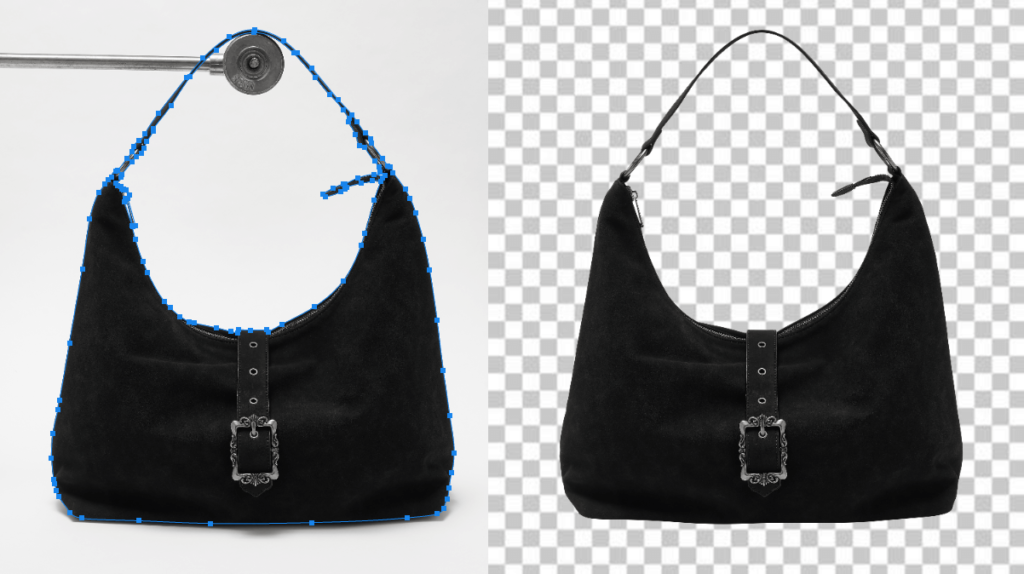
The first step is isolating the product from its original background. This is done using the clipping path technique — manually drawing a precise path around the product outline using Photoshop’s Pen Tool.
For simple products with clean edges (boxes, bottles, shoes), clipping path is fast and precise. For complex products — mesh fabrics, jewelry with thin chains, flyknit textures — image masking techniques are used to preserve fine detail while removing the background cleanly.
Once the background is removed, it’s replaced with:
- Pure white (#FFFFFF) — required for Amazon, Walmart, and most marketplaces
- Transparent PNG — for web use and layered compositions
- Lifestyle or branded backgrounds — for brand campaigns and social media
Step 2 — Color Correction
Color accuracy is the single most important technical aspect of product image retouching. A red dress that appears orange in the listing, or a tan leather bag that looks brown — these color discrepancies are the leading cause of product returns and negative reviews.
Professional color correction involves:
- White balance correction — removing warm or cool color casts from studio lighting
- Exposure adjustment — brightening product details without blowing out highlights
- Hue and saturation control — matching colors to physical product samples or brand Pantone references
- Batch consistency — ensuring all images in a catalog have the same color treatment
Step 3 — Surface Cleaning and Blemish Removal
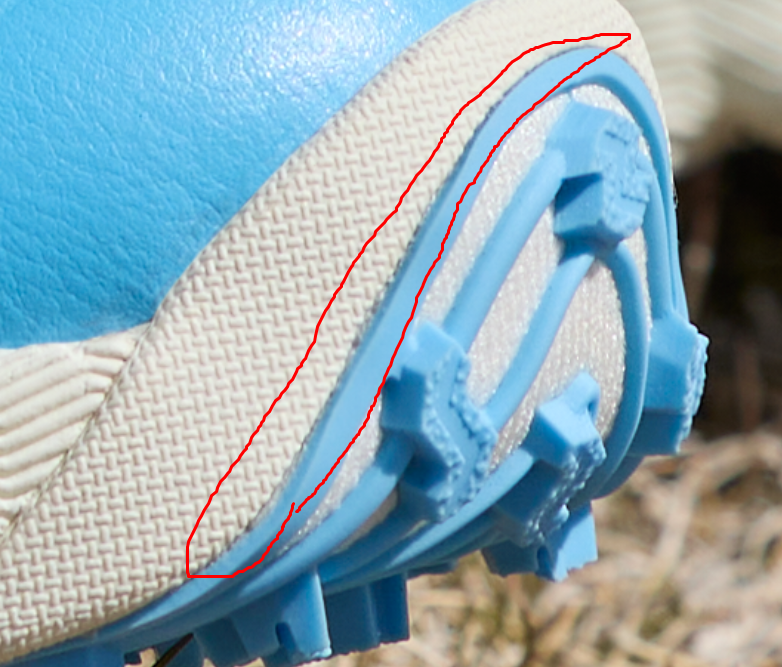
Even the most carefully prepared product picks up dust, fingerprints, lint, and micro-scratches during the shoot. At full resolution, these imperfections are clearly visible — and they signal low quality to buyers.
Using Photoshop’s Healing Brush, Clone Stamp, and Spot Healing tools, retouchers systematically clean the product surface without altering its natural texture or material. The goal is a spotless product that still looks authentically real — not over-processed or plastic.
Step 4 — Shadow Creation
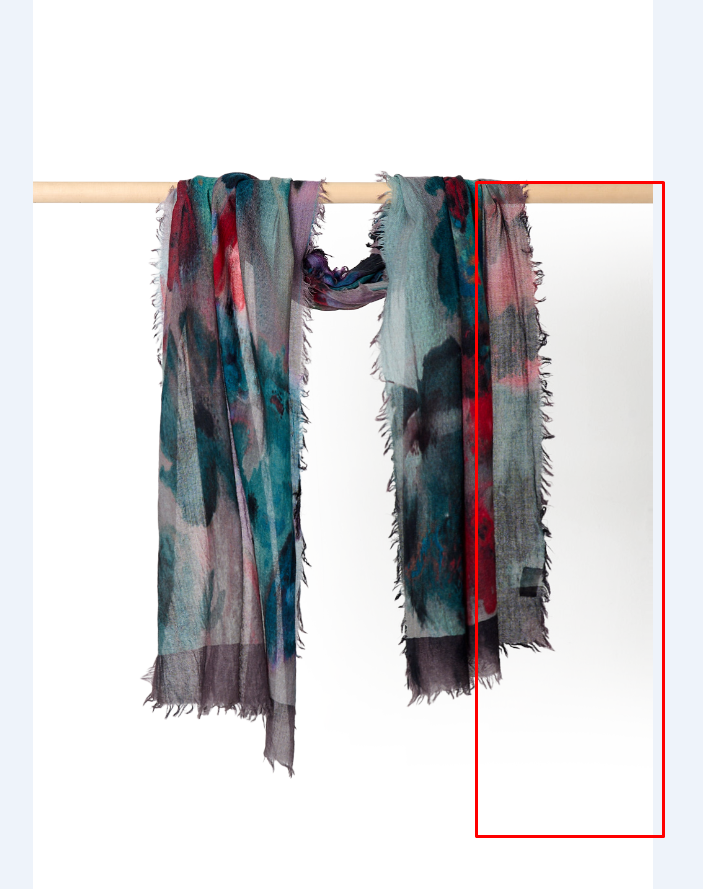
A product image with no shadow looks like it’s floating in mid-air — which feels unnatural and cheap. Adding the right shadow type anchors the product to its surface and gives the image a three-dimensional, realistic quality.
There are three main shadow types used in product image retouching:
| Shadow Type | Best For | Look |
|---|---|---|
| Drop Shadow | eCommerce packshots, catalog pages | Clean, soft shadow below the product |
| Natural Shadow | Lifestyle and campaign imagery | Realistic shadow matching original light direction |
| Reflection Shadow | Electronics, footwear, premium products | Mirror-like reflection below the product |
Our professional Photoshop shadow service creates natural, realistic shadows that make product images look polished and commercially ready.
Step 5 — Texture and Detail Enhancement
For premium products — leather goods, jewelry, textiles, electronics — texture detail is a major selling point. Buyers want to see the grain of the leather, the weave of the fabric, the precision of the metalwork.
Using sharpening, clarity, and frequency separation techniques, retouchers bring out surface texture and fine details without creating noise or artificiality. This is one of the most skill-dependent parts of professional product retouching.
Step 6 — Shape Correction and Alignment
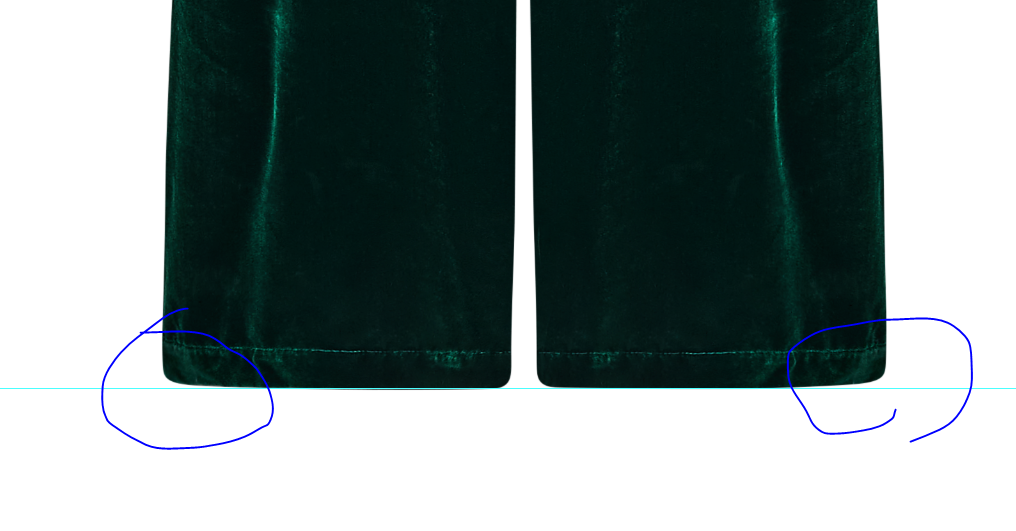
Camera lens distortion, shooting angle, and product positioning can all cause the product to appear slightly warped or misaligned in the final image. Retouchers use Photoshop’s transform tools and liquify brush to subtly correct shape, straighten lines, and ensure the product appears symmetrical and properly proportioned.
Step 7 — Final Quality Check and Export
Before delivery, every retouched image goes through a quality check — verifying background accuracy (pure white test), color consistency, edge cleanliness, shadow correctness, and file specification compliance. Images are then exported in the required formats, sizes, and resolutions for each platform.
Need Professional Product Image Retouching?
Clipping Path CA delivers pixel-perfect product retouching for eCommerce sellers and brands. Manual editing by expert Photoshop retouchers — fast turnaround, from $0.25/image.
Product Image Retouching by Product Type
Different products present different retouching challenges. A one-size-fits-all approach doesn’t work in professional product retouching. Here’s how the workflow adapts to different product categories:
Apparel and Fashion
Clothing presents unique challenges — fabric wrinkles, loose threads, inconsistent folds, and size/shape distortion from hangers or lay-flat shooting. Professional retouching for apparel includes wrinkle smoothing, shape correction to simulate on-model fit, color accuracy for fabrics (which shift significantly under different lights), and consistent ghost mannequin editing for a clean, structured look.
Read more: Ghost Mannequin Service — Professional Invisible Mannequin Editing
Jewelry and Accessories
Jewelry is one of the most demanding product categories for retouching. Diamonds, gemstones, and polished metals are highly reflective, capturing every studio light, fingerprint, and microscopic scratch. Professional jewelry retouching involves removing unwanted reflections while preserving the natural sparkle, enhancing gemstone clarity, cleaning metal surfaces, and adding subtle shine enhancement to make pieces look as luxurious on screen as they do in person.
Electronics and Tech Products
Screens, metallic casings, and glossy plastics create significant reflection and glare challenges. Retouching for electronics focuses on removing reflections from screens and casings, correcting color accuracy for product colorways, adding subtle drop shadows, and ensuring the product appears sharp and precise — communicating technical quality and build integrity.
Food and Beverage
Food photography retouching requires an especially delicate touch. The goal is to make food look as appetizing and fresh as possible — without making it look artificial or digitally manipulated. This includes color vibrancy enhancement, steam and liquid effect additions, plate and surface cleaning, and shadow work that gives dishes a warm, inviting depth.
Footwear
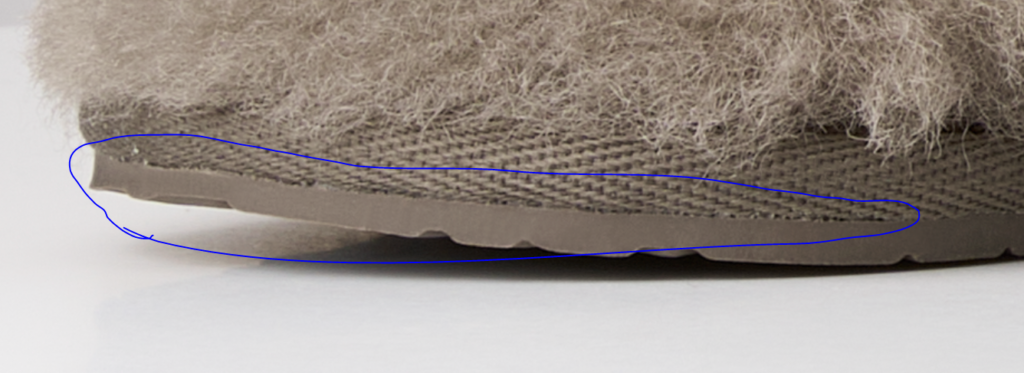
Shoes require careful background removal, surface cleaning (sole marks, scuffs, dust), lace tidying, and shape correction. Leather shoes need glare management and texture enhancement, while sneakers often need sole whitening and mesh detail preservation. Consistent positioning and sizing across a range is critical for footwear catalog retouching.
Furniture and Home Decor
Large products like furniture are often shot in situ — in a styled room set — meaning background work is more complex. Retouching for home products includes perspective correction, color accuracy for wood grains and fabrics, dust and scratch removal, and careful shadow creation that makes pieces look grounded and real in their environment.
| Product Type | Key Retouching Challenge | Priority Technique |
|---|---|---|
| Apparel | Wrinkles, shape, fabric color shift | Ghost mannequin, color correction |
| Jewelry | Reflections, fingerprints, sparkle | Frequency separation, reflection removal |
| Electronics | Screen glare, metallic reflections | Reflection control, color correction |
| Food | Color vibrancy, freshness | Color grading, subtle enhancement |
| Footwear | Dust, scuffs, shape, sole marks | Surface cleaning, background removal |
| Furniture | Perspective, texture, environment | Perspective correction, shadow work |
Platform Image Requirements You Must Meet
Non-compliant images get suppressed or rejected on major marketplaces. Professional product image retouching ensures your images meet every platform’s technical requirements:
| Platform | Background | Min Size | File Format | Notes |
|---|---|---|---|---|
| Amazon | Pure white RGB 255,255,255 | 1000×1000px | JPEG, PNG | 1600px+ for zoom |
| eBay | White preferred | 500×500px | JPEG, PNG | Max 12MB per image |
| Shopify | Any (white recommended) | 800×800px+ | JPEG, PNG, WebP | Square preferred |
| Etsy | Any | 2000×2000px | JPEG, PNG, GIF | Lifestyle images encouraged |
| Walmart | Pure white | 1500×1500px | JPEG | No watermarks |
| Zalando | White or light grey | 762×1100px | JPEG | Portrait format required |
Product Image Retouching Pricing Guide 2026
Retouching prices vary based on complexity, volume, and turnaround time. Here’s a clear breakdown of what you can expect to pay in 2026:
Basic Retouching
Basic product retouching covers background removal, simple color correction, and minor surface cleaning. This is the standard tier for eCommerce sellers with well-shot product photos that need a clean, marketplace-ready finish.
| Service | Price Per Image | Best For |
|---|---|---|
| Background removal only | $0.25 – $1.00 | Simple products, bulk orders |
| Basic retouch + white background | $0.79 – $2.50 | eCommerce catalog images |
| Color correction + cleanup | $1.00 – $3.00 | Fashion, apparel, accessories |
Standard Professional Retouching
Standard retouching handles more visible issues — reflections, wrinkles, surface flaws, shadow creation, and color matching to brand references. This tier is where brands start to see a real visible difference in quality.
| Service | Price Per Image | Best For |
|---|---|---|
| Standard product retouch | $2.99 – $8.00 | Apparel, footwear, accessories |
| Reflection removal | $3.00 – $10.00 | Electronics, jewelry, metallic products |
| Shadow creation | $1.50 – $5.00 | All product categories |
| Ghost mannequin | $3.00 – $8.00 | Apparel brands, clothing retailers |
Advanced and Commercial Retouching
Advanced retouching is for premium brands, advertising campaigns, and editorial imagery where images are viewed at large scale and need to withstand close scrutiny.
| Service | Price Per Image | Best For |
|---|---|---|
| High-end jewelry retouching | $10 – $30 | Luxury jewelry brands |
| Complex composite editing | $25 – $100+ | Campaign imagery, advertising |
| Commercial / editorial retouching | $15 – $150+ | Magazine, billboard, brand campaigns |
Bulk and Volume Pricing
For large catalogs, most professional retouching services offer volume discounts. At Clipping Path CA, bulk pricing makes it easy to manage high-volume product shoots without compromising quality:
| Volume | Discount |
|---|---|
| 1 – 99 images | Standard rate |
| 100 – 499 images | Up to 10% off |
| 500 – 999 images | Up to 20% off |
| 1,000+ images | Custom quote (best rate) |
DIY vs. Professional Product Image Retouching
Should you retouch your product images yourself, or outsource to professionals? The answer depends on your volume, skill level, and how much time you have. Here’s an honest comparison:
| DIY Retouching | Professional Service | |
|---|---|---|
| Cost | Low (software only) | Per-image fee |
| Time | High (hours per image) | Fast turnaround (24–48 hrs) |
| Quality | Variable | Consistent, high-quality |
| Scalability | Limited | 100s or 1000s of images |
| Platform compliance | Risk of errors | Guaranteed compliance |
| Best for | Hobbyists, 1–10 images/month | eCommerce brands, agencies |
The rule of thumb: if you’re shooting more than 20 product images per month, outsourcing retouching to a professional service saves significant time and consistently produces better results than DIY editing. The time you save can be reinvested in marketing, customer service, or growing your product range.
Read more: eCommerce Photo Editing — Complete Guide for Online Sellers
Common Product Image Retouching Mistakes to Avoid
❌ Over-Retouching
The most common mistake — making the product look so perfect that it no longer looks real. Buyers can spot over-edited images instantly. Leather that looks like plastic, fabrics that look painted on, colors that are clearly oversaturated — these all destroy buyer confidence. Keep retouching subtle, realistic, and true to the product.
❌ Inaccurate Colors
Boosting saturation to make products “pop” often creates inaccurate colors that don’t match the physical product. Always compare the retouched image against a physical sample or brand color reference before approving.
❌ Jagged or Halo Edges
Poor background removal leaves visible jagged edges or a light halo around the product — a telltale sign of low-quality editing. Always use manual clipping path or precise masking for clean, professional edges.
❌ Inconsistency Across the Catalog
If some images have drop shadows and others don’t, or if the white balance shifts between products, your store looks unprofessional. Establish a style guide and ensure every image in your catalog is treated consistently.
❌ Wrong File Specs for the Platform
Submitting images in the wrong size, resolution, or format can result in listing suppression. Always check platform requirements before final export and ensure images meet the exact specifications of every marketplace where you sell.
❌ Skipping the Quality Check
A final QC pass is non-negotiable in professional retouching. Check every edge, verify background purity (RGB 255,255,255 for Amazon), confirm shadow consistency, and review color accuracy before approving any batch.
Product Image Retouching Trends in 2026
AI-Assisted Retouching
AI tools are now capable of handling basic background removal, color correction, and batch processing at impressive speed. However, AI still struggles with complex product outlines, fine edge details, and nuanced color matching. The 2026 standard is a hybrid approach — AI handles the repetitive tasks, humans handle the precision work and final quality control.
Minimalist Visual Style
Premium brands are moving toward a cleaner, more minimal retouching style — less heavy-handed editing, more focus on letting the product’s natural texture, material, and craftsmanship speak for itself. Subtle color grading, muted earth tones, and warm neutrals are dominating brand visual identities in 2026.
360-Degree and 3D Retouching
As 360-degree product views become standard on premium eCommerce platforms, retouching workflows now need to handle consistent editing across multiple frames of a spin sequence — ensuring color, shadow, and surface treatment remain consistent across every angle in a 360-degree product view.
Brand Consistency at Scale
Brands in 2026 are investing in detailed visual style guides that define exact retouching parameters — shadow type, color treatment, background value, sharpening level — and applying these consistently across hundreds or thousands of SKUs. Consistent visual identity is now treated as seriously as logo and typography in brand strategy.
How to Choose the Right Product Image Retouching Service
With so many retouching services available, choosing the right partner is critical. Here’s what to look for:
- Manual editing capability — for complex products, AI alone isn’t enough. Ensure the service uses skilled human retouchers for final quality.
- Transparent per-image pricing — avoid services that bundle retouching into opaque packages with hidden revision fees.
- Fast turnaround — a professional service should deliver within 24–48 hours for standard orders.
- Free trial option — always test with sample images before committing to a bulk order.
- Unlimited revisions — your retouching partner should stand behind their work with free revisions until you’re satisfied.
- Experience across product categories — a service that specializes in your product type will deliver better results than a generalist.
At Clipping Path CA, we’ve been delivering professional product image retouching for eCommerce brands, photographers, and agencies worldwide for over a decade. Our team of expert Photoshop retouchers handles everything from simple background removal to complex composite editing — with a 24-hour standard turnaround and free revisions on every order.
Conclusion
Product image retouching is not optional in 2026’s competitive eCommerce landscape — it’s a fundamental production step that directly impacts your conversion rate, return rate, marketplace compliance, and brand perception.
The best retouching is invisible. Buyers shouldn’t think “that’s a well-edited photo.” They should think “that product looks amazing — I want it.” When retouching does its job perfectly, it builds confidence, reduces friction, and gets more buyers to click that Add to Cart button.
Whether you handle five products a month or five thousand, investing in professional product image retouching pays for itself many times over in higher conversions, fewer returns, and a stronger brand that buyers trust and return to.
Ready to Transform Your Product Images?
Clipping Path CA specializes in professional product image retouching for eCommerce brands and sellers worldwide. Background removal, color correction, shadow effects, surface cleaning — all done manually by expert Photoshop retouchers. Starting from just $0.25 per image with 24-hour turnaround.